 Bjorn3D.com Bjorn3d.com – Satisfying Your Daily Tech Cravings Since 1996
Could the GIGABYTE GTX 480 be faster than even the new Nvidia 500 series? We’ll take a look at that in this review.
Introduction
It has been a while since we have reviewed a GTX 480 video card, and with the newly released GF114 GTX 580 GPUs, Nvidia announced that their older GTX 480 (GF100 GPUs) have been discontinued from production. Interestingly, in November 2010, GIGABYTE still announced their highly anticipated GTX 480 Super Overclock video card (also known as the GTX 480 SOC), and it seems that there are still quite a few cards available online. GIGABYTE is famous for their Super Overclocked cards, which use very high quality components that not only provide fantastic results under factory overclocked settings, but also allow users to run their cards at frequencies above the already highly-overclocked specifications that other manufacturers have. These cards are designed with extreme overclockers in mind, providing them with features and voltage settings that require exotic cooling (LN2) or powerful water cooling to keep the card cool. In return these cards can reach frequencies unmatched by most others on the market. GIGABYTE also installed a more efficient vapor chamber designed air cooler with their triple fan design. With such cooling, the users can enjoy overclocked performance at quiet operation while maintaining great temperatures during full load.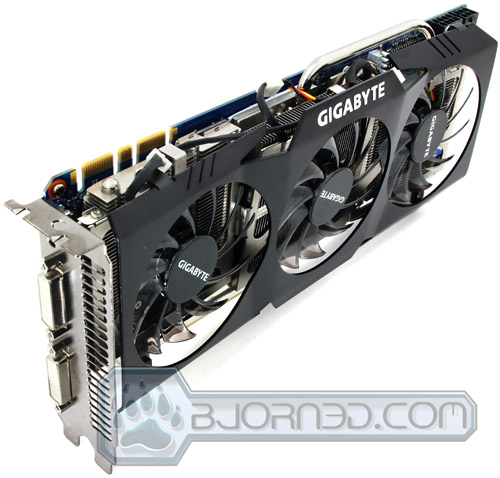
The GIGABYTE GTX 480 SOC has quite a bit of performance up its sleeves. With factory overclocked frequencies, the GTX 480 SOCruns at 820 MHz Core Clock speed, 1640 MHz Shader Clock (or in another words Processor Clock speed), and 3800 MHz memory Clock frequency. The reference speeds from Nvidia that most manufacturers use on their stock cards run at 700 MHz Core Clock, 1401 MHz Shader Clock speed, and 3696 MHz memory clock frequency. So we can definitely see some performance increase in the frequencies all around. With the GTX 480 SOC’s components and cooler, there is more overclocking potential possible, and it will be interesting to see if it is possible to reach the speeds that current GTX 580s run at without breaking a sweat on overclocking.
Before we continue to the other pages in this review, let’s examine what features the card offers for users interested in overclocking their video cards. One very nice feature for this card is GIGABYTE’S OC GURU overclocking tool, which provides the user with overclocking features that other overclocking tools like MSI Afterburner 2.1.0 BETA 7 do not. Sometimes overclocking tools that are not provided by the manufacturer have limitations on their GPU voltages ranges, the frequency settings, and much more, but In most cases we find other overclocking tools besides the one that the manufacturer provides the best.
|
In this case it’s the other way around. We have tested MSI Afterburner 2.1.0 BETA 7 to see what it offers us with the GTX 480 SOC. After a few minutes of playing with it, we were very disappointed because it only gave us the option to overclock up to 1.14V for the GPU on the GIGABYTE GTX 480 SOC and it had no memory overvoltage options. With GIGABYTE’s OC GURU tool, we were able to overvolt the card by up to 1.4V over the standard 1.075V that the card came with. The OC GURU tool also provided us with additional 0.3V overvoltage on the memory. After playing around with the voltages a tiny bit, a 0.4V bump in the Core voltage made the card overheat with GIGABYTE vapor chamber air cooler at 100% fan speed. This just shows that with even higher voltages on the cards, users can use water cooling, or even liquid nitrogen to take their cards to the next level. Using the OC GURU application that GIGABYTE included with their GTX 480 SOC video card might be a bit confusing for some–it was definitely confusing for us. Because OC GURU would not read the voltage settings from the card, and when the voltage would be altered, none of the other applications like GPU-Z or MSI Afterburner could read the voltages accurately, we were confused as to whether the application was actually altering the voltages at all. After testing and tweaking, we realized that it was definitely changing the voltages even though the voltage reading would not work. We hope that GIGABYTE will fix this problem in their future software update. |
Click Image to Enlarge
|

GIGABYTE also includes a very nice feature on their cards. This video card comes with two BIOS chips which not only provides security for the user in case overclocking fails, but also the option to switch between a standard BIOS and an LN2 BIOS. The LN2 BIOS is for extreme overclockers using liquid nitrogen to cooler their video cards. Sometimes video cards won’t boot because the GPU and other components get too cold, and with this BIOS the cold bug issue is fixed.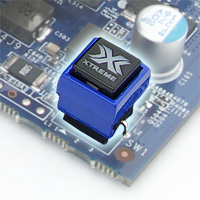
Both BIOSes are programmable, so one can be saved with a certain overclocked setting, while the other one stays at factory overclocked settings. The BIOS can be switched while the PC is running, even in Windows, and the new settings will take effect instantly.
In this review, we will mainly focus on checking out how the GIGABYTE GTX 480 SOC compares to Nvidia’s latest GTX 580 video card, and also give appropriate advice to those considering buying a GTX 480 as their primary or secondary (SLI) GPU. Let’s check out if the GTX 480 SOC still has enough potential to keep up with some of the latest DirectX 10 and DirectX 11 titles on the market.
Specifications
On the first page, we discussed the differences between a reference card GTX 480 and the GIGABYTE GTX 480 SOC. Now let’s take a look at how the card compares to the GTX 580 that was recently released in November 2010. The biggest difference we can see is the number of CUDA Cores that each card has. The GTX 580 has a total of 512 CUDA cores while the GTX 480 SOC only has 480. The interesting part to remember though is that the GTX 480 SOC runs at a higher core clock and shader frequency than the GTX 580. We will put both cards to the test along with some lower end cards to see how they compare to each other.
Besides the CUDA Cores and the frequency differences, the cards are quite identical. Of course, the GTX 580 had GPU transistor optimization for lower power consumption, temperatures, and another another PolyMorph engine has been added, but we still think it’s a fair comparison.
| Series | GeForce 400 Series | GeForce 500 Series |
| Chipset | GeForce GTX 480 | GeForce GTX 580 |
| Key Features | SOC | Reference Card |
| Core Clock | 820 MHz | 772 MHz |
| Shader Clock | 1640 MHz | 1544 MHZ |
| Memory Clock | 3800 MHz | 4008 MHz |
| CUDA Cores | 480 | 512 |
| Memory Type | GDDR5 | GDDR5 |
| DirectX | 11 | 11 |
| D-sub | Yes (By Adapter) | Yes (By Adapter) |
| DVI | Yes | Yes |
| HDMI | Yes | Yes |
| Memory Size | 1536 MB | 1536 MB |
| TV-OUT | No | No |
Overclocking

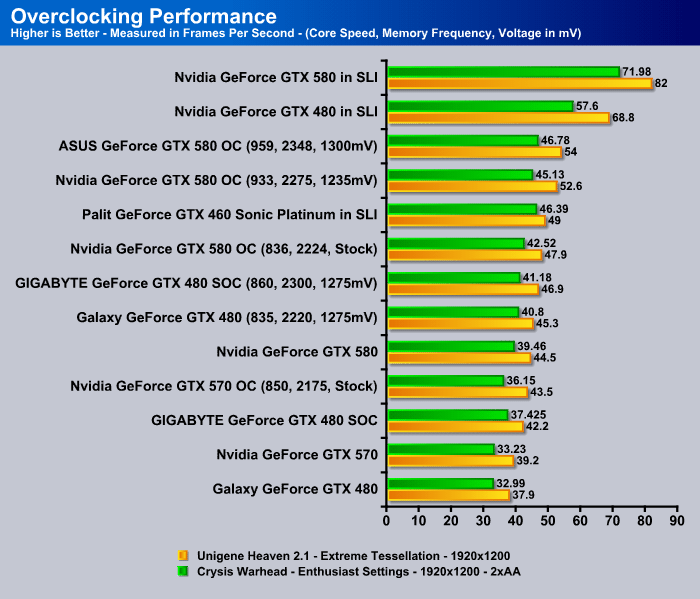
The GIGABYTE GTX 480 Super Overclock video card is a snap to work with in the overclocking field. Its new vapor chamber design air cooler provides enough air to cool down the card at quiet operations. For those used to the noise level on standard GTX 480 video cards, the fans on the GIGABYTE GTX 480 SOC can be ramped up quite a bit to achieve the same noise levels as the reference cooler. However, the GIGABYTE Vapor Chamber design cooler will provide even better performance during gaming, especially after the card is overclocked past it’s factory overclocked settings. We can see that the GIGABYTE GTX 480 SOC was able to achieve higher clock speeds at lower voltage settings. This is perfect for those trying to get the most out of their cards without needing to push the voltages too high.
TEMPERATURES

To measure the temperature of the video card, we used MSI Afterburner and ran Metro 2033 for 10 minutes to find the Load temperatures for the video cards. The highest temperature was recorded. After playing for 10 minutes, Metro 2033 was turned off and we let the computer sit at the desktop for another 10 minutes before we measured the idle temperatures.
| Video Cards – Temperatures – Ambient 23C | Idle | Load (Fan Speed) |
|---|---|---|
| 2x Palit GTX 460 Sonic Platinum 1GB GDDR5 in SLI |
31C | 65C |
| Palit GTX 460 Sonic Platinum 1GB GDDR5 |
29C | 60C |
| Galaxy GeForce GTX 480 |
53C | 81C (73%) |
| GIGABYTE GeForce GTX 480 SOC |
42C (48%) | 81C (59%) |
| Nvidia GeForce GTX 580 | 39C | 73C (66%) |
| ASUS GeForce GTX 580 | 38C | 73C (66%) |
| Nvidia GeForce GTX 570 | 39C |
81C (58%) |
Let’s take a closer look at the temperatures the GTX 480 SOC had to offer. It seems that the focus for this card was put into maintaining quiet operation during full load. We can see that the Galaxy GeForce GTX 480 had to run its fan at 73% while maintaining the same temperatures as the GIGABYTE GTX 480 SOC at only 59% fan speed only shows how GIGABYTE’s new cooler design excels. GIGABYTE’s triple fan design is perfect in our opinion, because three fans don’t need to run as fast as a single fan would need to run at to accomplish the same amount of air being pushed through the heatsink fins. With lower RPM, there is less noise caused by the air being pushed through the fins of the heatsink, as well as less motor noise from the fan itself. We are quite impressed with the GTX 480 SOC in our temperature tests.
POWER CONSUMPTION

To get our power consumption numbers, we plugged in our Kill A Watt power measurement device and took the Idle reading at the desktop during our temperature readings. We left it at the desktop for about 15 minutes and took the idle reading. Then we ran Metro 2033 for a few minutes minutes and recorded the highest power consumption.
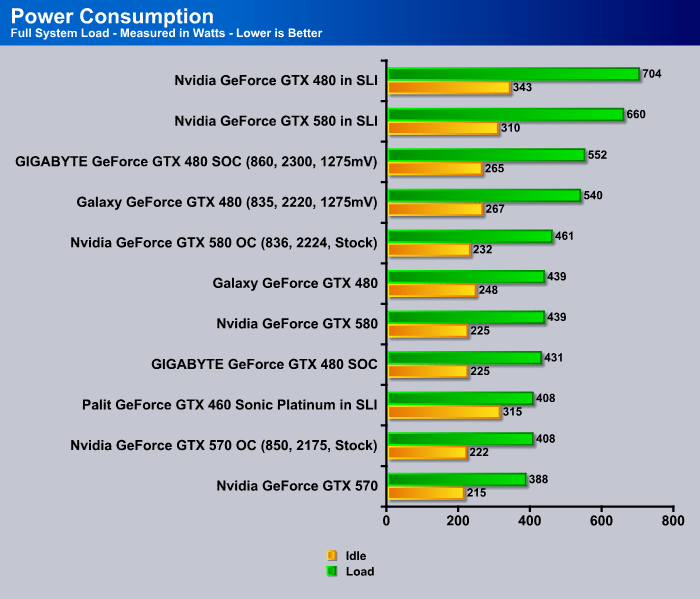
Interestingly, the GIGABYTE GTX 480 SOC showed interesting drops in power consumption while running overclocked. It’s very interesting that the GTX 480 SOC is running at almost the same speeds that our Galaxy GTX 480 OC was running at, though the Galaxy GTX 480 OC used far more power than the GTX 480 SOC. We realized that the GIGABYTE GTX 480 SOC was able to run at lower voltages while overclocked than the Galaxy GTX 480 running at stock speeds. After overclocking the GIGABYTE GTX 480 SOC, the power consumption was a bit higher then the Galaxy GTX 480, though the performance was higher as well. However, if we compare the GIGABYTE GTX 480 SOC to an Nvidia GTX 580 reference card, we can see that the GTX 480 SOC uses far more power than the GTX 580, while the GTX 580 is able to run a bit faster than the overclocked GTX 480 SOC. The GTX 580 has a far better power efficiency than the older GF100 chips. This is not surprising, since Nvidia did re-engineer at the transistor level to optimize their GF110 GPUs for better power efficiency while providing even more performance overall for a single GPU.
Features
Besides the Super Overclock information that GIGABYTE included below, I feel that their SOC cards come with higher quality components to accomplish stable overclocks. They provide the possibility for liquid nitrogen users to take advantage of the card to the fullest. We’ll put this to the test and see how far we can push the card with their vapor chamber cooler.

2. Supports PCI Express 2.0
3. Microsoft DirectX 11 and OpenGL 4.0 support
4. Integrated with industry’s best 1536 MB GDDR5 memory and 384-bit memory interface
5. Supports NVIDIA PureVideo® HD technology
6. Features Dual link DVI-I*2 / mini HDMI with HDCP protection


What is CUDA?
CUDA is NVIDIA’s parallel computing architecture that enables dramatic increases in computing performance by harnessing the power of the GPU (graphics processing unit).
With millions of CUDA-enabled GPUs sold to date, software developers, scientists and researchers are finding broad-ranging uses for CUDA, including image and video processing, computational biology and chemistry, fluid dynamics simulation, CT image reconstruction, seismic analysis, ray tracing and much more.
Computing is evolving from “central processing” on the CPU to “co-processing” on the CPU and GPU. To enable this new computing paradigm, NVIDIA invented the CUDA parallel computing architecture that is now shipping in GeForce, ION, Quadro, and Tesla GPUs, representing a significant installed base for application developers.
In the consumer market, nearly every major consumer video application has been, or will soon be, accelerated by CUDA, including products from Elemental Technologies, MotionDSP and LoiLo, Inc.
CUDA has been enthusiastically received in the area of scientific research. For example, CUDA now accelerates AMBER, a molecular dynamics simulation program used by more than 60,000 researchers in academia and pharmaceutical companies worldwide to accelerate new drug discovery.
In the financial market, Numerix and CompatibL announced CUDA support for a new counterparty risk application and achieved an 18X speedup. Numerix is used by nearly 400 financial institutions.
An indicator of CUDA adoption is the ramp of the Tesla GPU for GPU computing. There are now more than 700 GPU clusters installed around the world at Fortune 500 companies ranging from Schlumberger and Chevron in the energy sector to BNP Paribas in banking.
And with the recent launches of Microsoft Windows 7 and Apple Snow Leopard, GPU computing is going mainstream. In these new operating systems, the GPU will not only be the graphics processor, but also a general purpose parallel processor accessible to any application.
For information on CUDA and OpenCL, click here.
For information on CUDA and DirectX, click here.
For information on CUDA and Fortran, click here.
PhysX
Some Games that use PhysX (Not all inclusive)
 |
Batman: Arkham Asylum Watch Arkham Asylum come to life with NVIDIA® PhysX™ technology! You’ll experience ultra-realistic effects such as pillars, tile, and statues that dynamically destruct with visual explosiveness. Debris and paper react to the environment and the force created as characters battle each other; smoke and fog will react and flow naturally to character movement. Immerse yourself in the realism of Batman Arkham Asylum with NVIDIA PhysX technology. |
 |
Darkest of Days Darkest of Days is a historically based FPS where gamers will travel back and forth through time to experience history’s “darkest days”. The player uses period and future weapons as they fight their way through some of the epic battles in history. The time travel aspects of the game, lead the player on missions where they at times need to fight on both sides of a war. |
 |
Sacred 2 – Fallen Angel In Sacred 2 – Fallen Angel, you assume the role of a character and delve into a thrilling story full of side quests and secrets that you will have to unravel. Breathtaking combat arts and sophisticated spells are waiting to be learned. A multitude of weapons and items will be available, and you will choose which of your character’s attributes you will enhance with these items in order to create a unique and distinct hero. |
 |
Dark Void Dark Void is a sci-fi action-adventure game that combines an adrenaline-fuelled blend of aerial and ground-pounding combat. Set in a parallel universe called “The Void,” players take on the role of Will, a pilot dropped into incredible circumstances within the mysterious Void. This unlikely hero soon finds himself swept into a desperate struggle for survival. |
 |
Cryostasis Cryostasis puts you in 1968 at the Arctic Circle, Russian North Pole. The main character, Alexander Nesterov is a meteorologist incidentally caught inside an old nuclear ice-breaker North Wind, frozen in the ice desert for decades. Nesterov’s mission is to investigate the mystery of the ship’s captain death – or, as it may well be, a murder. |
 |
Mirror’s Edge In a city where information is heavily monitored, agile couriers called Runners transport sensitive data away from prying eyes. In this seemingly utopian paradise of Mirror’s Edge, a crime has been committed and now you are being hunted. |
What is NVIDIA PhysX Technology?
NVIDIA® PhysX® is a powerful physics engine enabling real-time physics in leading edge PC games. PhysX software is widely adopted by over 150 games and is used by more than 10,000 developers. PhysX is optimized for hardware acceleration by massively parallel processors. GeForce GPUs with PhysX provide an exponential increase in physics processing power taking gaming physics to the next level.
What is physics for gaming and why is it important?
Physics is the next big thing in gaming. It’s all about how objects in your game move, interact, and react to the environment around them. Without physics in many of today’s games, objects just don’t seem to act the way you’d want or expect them to in real life. Currently, most of the action is limited to pre-scripted or ‘canned’ animations triggered by in-game events like a gunshot striking a wall. Even the most powerful weapons can leave little more than a smudge on the thinnest of walls; and every opponent you take out, falls in the same pre-determined fashion. Players are left with a game that looks fine, but is missing the sense of realism necessary to make the experience truly immersive.
With NVIDIA PhysX technology, game worlds literally come to life: walls can be torn down, glass can be shattered, trees bend in the wind, and water flows with body and force. NVIDIA GeForce GPUs with PhysX deliver the computing horsepower necessary to enable true, advanced physics in the next generation of game titles making canned animation effects a thing of the past.
Which NVIDIA GeForce GPUs support PhysX?
The minimum requirement to support GPU-accelerated PhysX is a GeForce 8-series or later GPU with a minimum of 32 cores and a minimum of 256MB dedicated graphics memory. However, each PhysX application has its own GPU and memory recommendations. In general, 512MB of graphics memory is recommended unless you have a GPU that is dedicated to PhysX.
How does PhysX work with SLI and multi-GPU configurations?
When two, three, or four matched GPUs are working in SLI, PhysX runs on one GPU, while graphics rendering runs on all GPUs. The NVIDIA drivers optimize the available resources across all GPUs to balance PhysX computation and graphics rendering. Therefore users can expect much higher frame rates and a better overall experience with SLI.
A new configuration that’s now possible with PhysX is 2 non-matched (heterogeneous) GPUs. In this configuration, one GPU renders graphics (typically the more powerful GPU) while the second GPU is completely dedicated to PhysX. By offloading PhysX to a dedicated GPU, users will experience smoother gaming.
Finally we can put the above two configurations all into 1 PC! This would be SLI plus a dedicated PhysX GPU. Similarly to the 2 heterogeneous GPU case, graphics rendering takes place in the GPUs now connected in SLI while the non-matched GPU is dedicated to PhysX computation.
Why is a GPU good for physics processing?
The multithreaded PhysX engine was designed specifically for hardware acceleration in massively parallel environments. GPUs are the natural place to compute physics calculations because, like graphics, physics processing is driven by thousands of parallel computations. Today, NVIDIA’s GPUs, have as many as 480 cores, so they are well-suited to take advantage of PhysX software. NVIDIA is committed to making the gaming experience exciting, dynamic, and vivid. The combination of graphics and physics impacts the way a virtual world looks and behaves.
Direct Compute
DirectCompute Support on NVIDIA’s CUDA Architecture GPUs
Microsoft’s DirectCompute is a new GPU Computing API that runs on NVIDIA’s current CUDA architecture under both Windows VISTA and Windows 7. DirectCompute is supported on current DX10 class GPU’s and DX11 GPU’s. It allows developers to harness the massive parallel computing power of NVIDIA GPU’s to create compelling computing applications in consumer and professional markets.
As part of the DirectCompute presentation at the Game Developer Conference (GDC) in March 2009 in San Francisco CA, NVIDIA demonstrated three demonstrations running on a NVIDIA GeForce GTX 280 GPU that is currently available. (see links below)
As a processor company, NVIDIA enthusiastically supports all languages and API’s that enable developers to access the parallel processing power of the GPU. In addition to DirectCompute and NVIDIA’s CUDA C extensions, there are other programming models available including OpenCL™. A Fortran language solution is also in development and is available in early access from The Portland Group.
NVIDIA has a long history of embracing and supporting standards since a wider choice of languages improve the number and scope of applications that can exploit parallel computing on the GPU. With C and Fortran language support here today and OpenCL and DirectCompute available this year, GPU Computing is now mainstream. NVIDIA is the only processor company to offer this breadth of development environments for the GPU.
OpenCL
| OpenCL (Open Computing Language) is a new cross-vendor standard for heterogeneous computing that runs on the CUDA architecture. Using OpenCL, developers will be able to harness the massive parallel computing power of NVIDIA GPU’s to create compelling computing applications. As the OpenCL standard matures and is supported on processors from other vendors, NVIDIA will continue to provide the drivers, tools and training resources developers need to create GPU accelerated applications.
In partnership with NVIDIA, OpenCL was submitted to the Khronos Group by Apple in the summer of 2008 with the goal of forging a cross platform environment for general purpose computing on GPUs. NVIDIA has chaired the industry working group that defines the OpenCL standard since its inception and shipped the world’s first conformant GPU implementation for both Windows and Linux in June 2009. |
 |

NVIDIA has been delivering OpenCL support in end-user production drivers since October 2009, supporting OpenCL on all 180,000,000+ CUDA architecture GPUs shipped since 2006.
NVIDIA’s Industry-leading support for OpenCL:
2010
March – NVIDIA releases updated R195 drivers with the Khronos-approved ICD, enabling applications to use OpenCL NVIDIA GPUs and other processors at the same time
January – NVIDIA releases updated R195 drivers, supporting developer-requested OpenCL extensions for Direct3D9/10/11 buffer sharing and loop unrolling
January – Khronos Group ratifies the ICD specification contributed by NVIDIA, enabling applications to use multiple OpenCL implementations concurrently
2009
November – NVIDIA releases R195 drivers with support for optional features in the OpenCL v1.0 specification such as double precision math operations and OpenGL buffer sharing
October – NVIDIA hosts the GPU Technology Conference, providing OpenCL training for an additional 500+ developers
September – NVIDIA completes OpenCL training for over 1000 developers via free webinars
September – NVIDIA begins shipping OpenCL 1.0 conformant support in all end user (public) driver packages for Windows and Linux
September – NVIDIA releases the OpenCL Visual Profiler, the industry’s first hardware performance profiling tool for OpenCL applications
July – NVIDIA hosts first “Introduction to GPU Computing and OpenCL” and “Best Practices for OpenCL Programming, Advanced” webinars for developers
July – NVIDIA releases the NVIDIA OpenCL Best Practices Guide, packed with optimization techniques and guidelines for achieving fast, accurate results with OpenCL
July – NVIDIA contributes source code and specification for an Installable Client Driver (ICD) to the Khronos OpenCL Working Group, with the goal of enabling applications to use multiple OpenCL implementations concurrently on GPUs, CPUs and other types of processors
June – NVIDIA release first industry first OpenCL 1.0 conformant drivers and developer SDK
April – NVIDIA releases industry first OpenCL 1.0 GPU drivers for Windows and Linux, accompanied by the 100+ page NVIDIA OpenCL Programming Guide, an OpenCL JumpStart Guide showing developers how to port existing code from CUDA C to OpenCL, and OpenCL developer forums
2008
December – NVIDIA shows off the world’s first OpenCL GPU demonstration, running on an NVIDIA laptop GPU at
June – Apple submits OpenCL proposal to Khronos Group; NVIDIA volunteers to chair the OpenCL Working Group is formed
2007
December – NVIDIA Tesla product wins PC Magazine Technical Excellence Award
June – NVIDIA launches first Tesla C870, the first GPU designed for High Performance Computing
May – NVIDIA releases first CUDA architecture GPUs capable of running OpenCL in laptops & workstations
2006
November – NVIDIA released first CUDA architecture GPU capable of running OpenCL
Unboxing The GIGABYTE GTX 480 SOC


When we opened up the box, we saw some nice accessories that we have not seen with many high-end video cards on the market. We were especially pleased to see the inclusion of the HDMI to mini-HDMI cable to connect the video card with a high definition monitor. We’ll take a look at the accessories below. As for overall packaging, the video card was especially well protected with soft foam block with a hole cut out exactly for the video card. Packaging a video card this way seems to be the most effective way to protect the card from any damage during shipment.

- HDMI to mini-HDMI cable
- DVI to VGA adapter
- 2 Molex to 8-pin PCI-E Power Cable Adapter
- 2 Molex to 6-pin PCI-E Power Cable Adapter
- User’s Manual
- Driver CD
Pictures & Impressions


It’s time to take a look at the GIAGABYTE GTX 480 SOC video card. Overall, it doesn’t have the most appealing aesthetics, but it’s not too bad if it’s viewed from either the PCB or the cooler side. We’ll have more pictures below. The black cover over the three fans seems to be a hard aluminum. It has a nice black brushed piano finish, which looks great and does not pick up too many fingerprints.
From these first 4 pictures, we can see that all ports, including the two DVI ports, the mini-HDMI port and one of the top SLI connectors are covered. This is great for those planning on using their cards for a long time. This prevents dust buildup in sensitive areas like the DVI ports, or on the SLI connectors.
The Power Design on this card still follows the standard specifications of the Nvidia GTX 480 cards. One 6-pin and 8-pin PCI-E power connector are required to fire up the card. On the opposite side of the card, we can see the BIOS switch, which will switch between the Factory set SOC settings and the LN2 BIOS. GIGABYTE recommends using the SOC BIOS rather than the LN2 BIOS for those not planning on using liquid nitrogen for cooling their video cards to prevent any stability issues. GIGABYTE also mentions that a restart is required to enable the full functions of each BIOS, though we have noticed that the BIOS can be switched during operation as well and the clock speeds will change instantly. This is a great option for those quickly switching between different OC settings.


The back of the card reveals a dark ocean blue PCB. We are not a big fan of this color, and personally we would have liked to see a black PCB theme because it would have looked much nicer with the black brushed piano finish cooler. Besides the color, GIGABYTE offers quite a few high quality components to provide the best possible overclocking for the users. The 5 massive components on the back of the card are the NEC Proadlizer film capacitors which help clean the ripple and noise in the current. It helps transmit more stable power, even on heavy loads. Right next to the NEC capacitors, we can see lots of low RDS (on) MOSFETs, and GIGABYTE’s implementation of power indicating LEDs, that give the user an idea about power status. If, for some reason, there is not enough power supplied to the card, the green LEDs will turn orange. There are two SLI connectors available for 3-way or 4-way SLI support on supported motherboards.


Now let’s take a look at the card from the side, The picture on the far left bottom corner shows the card from a side view. It looks a bit like a tornado went through it, bent the cover of the cooler, and threw the fan cables all over the place. It’s not that big of a deal however. Cooling is the main focus on this card, but GIGABYTE could have done a better job with the overall cover design.


If we take a closer look at the cooler design on this card, the GPU is cooled with a vapor chamber and heatpipe solution. The vapor chamber helps spread the heat much better then an ordinary copper base heatsink with heatpipes. We can also see that all the memory modules are in full contact with the whole custom designed heatsink. This is great, because higher overclocks are possible with well cooled memory modules. One very interesting addition to the card is the MOSFET cooler below the far right fan right next to the power connectors. This small heatsink provides cooling for additional components for the card, but is attached in a funky way around the PCB. This does not cause any obstruction to other components.
Testing Methodology
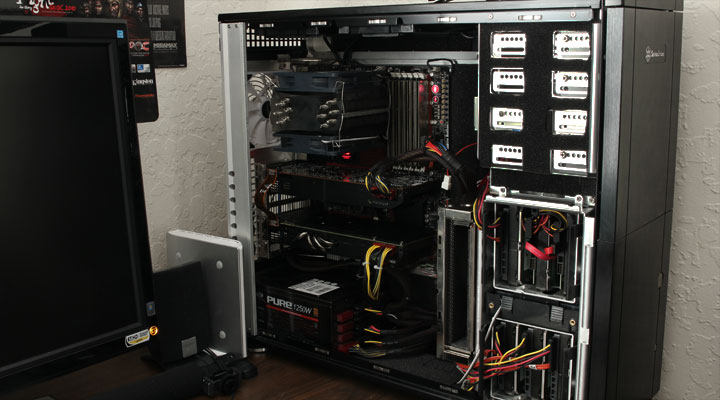
The OS we use is Windows 7 Pro 64bit with all patches and updates applied. We also use the latest drivers available for the motherboard and any devices attached to the computer. We do not disable background tasks or tweak the OS or system in any way. We turn off drive indexing and daily defragging. We also turn off Prefetch and Superfetch. This is not an attempt to produce bigger benchmark numbers. Drive indexing and defragging can interfere with testing and produce confusing numbers. If a test were to be run while a drive was being indexed or defragged, and then the same test was later run when these processes were off, the two results would be contradictory and erroneous. As we cannot control when defragging and indexing occur precisely enough to guarantee that they won’t interfere with testing, we opt to disable the features entirely.
Prefetch tries to predict what users will load the next time they boot the machine by caching the relevant files and storing them for later use. We want to learn how the program runs without any of the files being cached, and we disable it so that each test run we do not have to clear pre-fetch to get accurate numbers. Lastly we disable Superfetch. Superfetch loads often-used programs into the memory. It is one of the reasons that Windows Vista occupies so much memory. Vista fills the memory in an attempt to predict what users will load. Having one test run with files cached, and another test run with the files un-cached would result in inaccurate numbers. Again, since we can’t control its timings so precisely, it we turn it off. Because these four features can potentially interfere with benchmarking, and and are out of our control, we disable them. We do not disable anything else.
We ran each test a total of 3 times, and reported the average score from all three scores. Benchmark screenshots are of the median result. Anomalous results were discounted and the benchmarks were rerun.
Please note that due to new driver releases with performance improvements, we rebenched every card shown in the results section. The results here will be different than previous reviews due to the performance increases in drivers.
| Test Setup | |
| Case | Silverstone Temjin TJ10 |
| CPU |
Intel Core i7 2600K @ 4.8 GHz |
| Motherboard |
GIGABYTE P67A-UD7 |
| Ram |
Patriot Gamer 2 Series 1600 MHz Dual-Chanel 16GB (4x4GB) Memory Kit |
| CPU Cooler |
Heatblocker Rev 3.0 LGA 1156 CPU Waterblock Thermochill 240 Radiator |
| Hard Drives |
4x Seagate Cheetah 600GB 10K 6Gb/s Hard Drives 2x Western Digital RE3 1TB 7200RPM 3Gb/s Hard Drives |
| SSD | 1x Zalman SSD0128N1 128GB SandForce SSD |
| Optical | ASUS DVD-Burner |
| GPU |
2x Nvidia GeForce GTX580 in 2-Way SLI Nvidia GeForce GTX 580 1536MB ASUS ENGTX580 1536MB Nvidia GeForce GTX 570 1536MB Nvidia GeForce GTX 560 Ti GIGABYTE GeForce GTX 480 SOC 1536MB Galaxy GeForce GTX 480 1536MB 2x Palit GeForce GTX460 Sonic Platinum 1GB in 2-Way SLI Palit GeForce GTX460 Sonic Platinum 1GB ASUS Radeon HD6870 AMD Radeon HD5870 |
| Case Fans |
1x Quiet Zalman Shark’s Fin ZM-SF3 120mm Fan – Top 1x Silverstone 120mm fan – Front 1x Quiet Zalman ZM-F3 FDB 120mm Fan – Hard Drive Compartment |
| Additional Cards |
LSI 3ware SATA + SAS 9750-8i 6Gb/s RAID Card |
| PSU |
Sapphire PURE 1250W Modular Power Supply |
| Mouse | Razer Mamba |
| Keyboard | Logitech G15 |
Synthetic Benchmarks & Games
We will use the following applications to benchmark the performance of the Nvidia GeForce GTX 580 video card.
| Synthetic Benchmarks & Games | |
| 3DMark 11 | |
| 3DMark Vantage | |
| Metro 2033 |
|
| Just Cause 2 | |
| Lost Planet 2 | |
| Crysis | |
| Crysis Warhead | |
| Unigine Heaven v.2.1 | |
3DMark 11

“3DMark 11 is the latest version of the world’s most popular benchmark for measuring the graphics performance of gaming PCs. Designed for testing DirectX 11 hardware running on Windows 7 and Windows Vista the benchmark includes six all new benchmark tests that make extensive use of all the new features in DirectX 11 including tessellation, compute shaders and multi-threading. After running the tests 3DMark gives your system a score with larger numbers indicating better performance. Trusted by gamers worldwide to give accurate and unbiased results, 3DMark 11 is the best way to test DirectX 11 under game-like loads.”
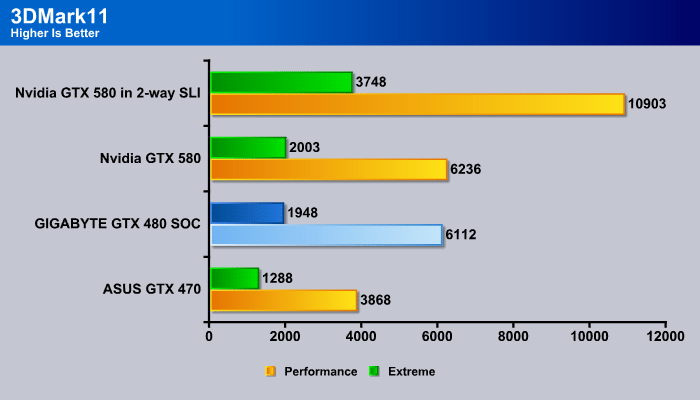
3DMark 11 is a new benchmark we have added to our latest GPU benchmark suite. With full DirectX 11 support, it makes a great comparison for several different DirectX 11 compatible video cards. We can instantly see that the GIGABYTE GTX 480 SOC has some potential in this field, proving almost as fast as the Nvidia GTX 580 reference cards. Since both are quietly cooled cards, according to the 3DMark 11 tests, the GIGABYTE GTX 480 SOC would be a better buy, as it is about $100 cheaper than the GTX 580. With a few more MHz on the core speed, the user can easily surpass the performance of a GTX 580.
3DMark Vantage

The newest video benchmark from the gang at Futuremark. This utility is still a synthetic benchmark, but one that more closely reflects real world gaming performance. While it is not a perfect replacement for actual game benchmarks, it has its uses. We tested our cards at the ‘Performance’ setting.
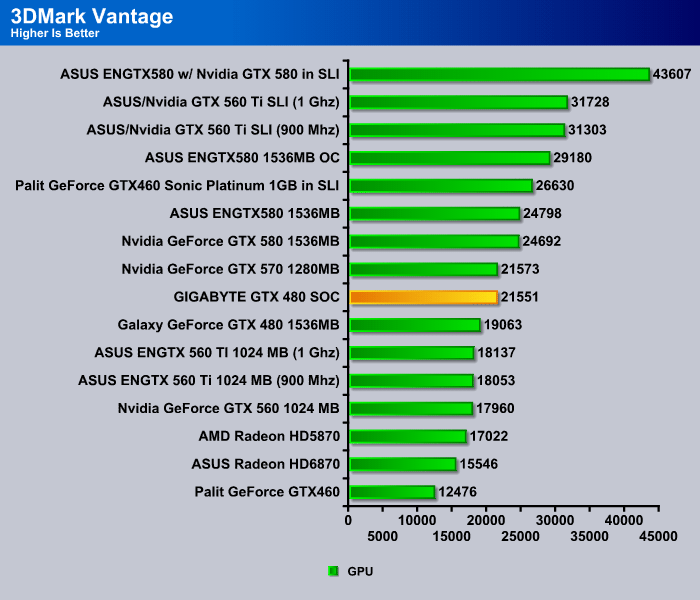
The older version of 3DMark shows slightly different results. 3DMark Vantage takes advantage of DirectX 10. Since Nvidia Fermi cards have been optimized mainly for Tessellation and DirectX 11 content, we see a slightly larger gap between the GTX 480 SOC and the GTX 580 video cards. The GTX 480 SOC was able to closely compete with the GTX 570 though, while a stock GTX 480 was about 2000 GPU points behind the GTX 570.
Unigine Heaven 2.1

Unigine Heaven is a benchmark program based on Unigine Corp’s latest engine, Unigine. The engine features DirectX 11, Hardware tessellation, DirectCompute, and Shader Model 5.0. All of these new technologies combined with the ability to run each card through the same exact test means this benchmark should be in our arsenal for a long time.
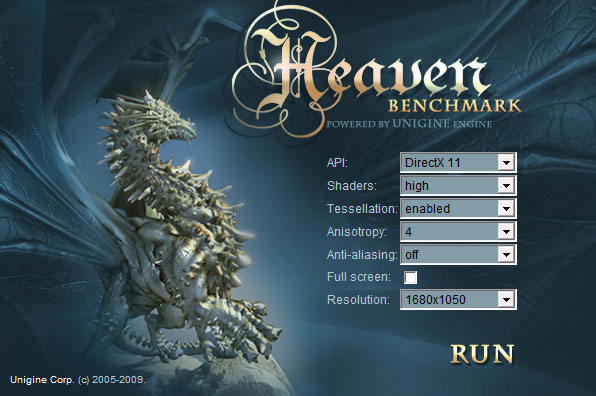
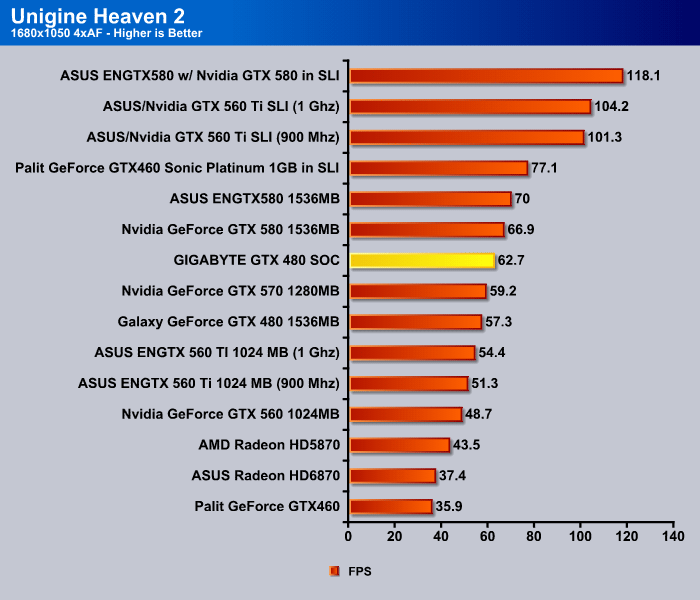
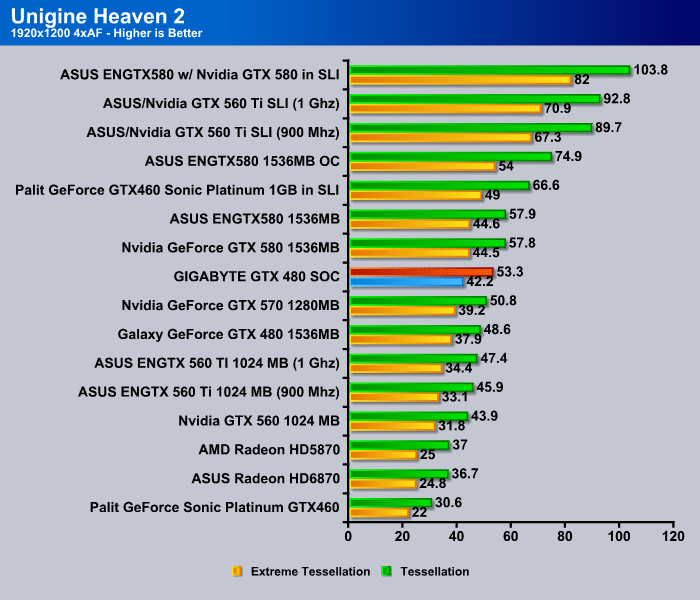
Unigine Heaven 2.1 also shows a larger gap between each video card, however, we notice that there is about a 5 frames per second increase on the standard tessellation tests, which is a noticable amount for a gamer. If the graphics settings were set even higher and the frames per second decreased by 20, a 5 FPS higher score could still make a game playable on this card, though the reference GTX 480 would struggle to keep up.
Crysis v 1.21

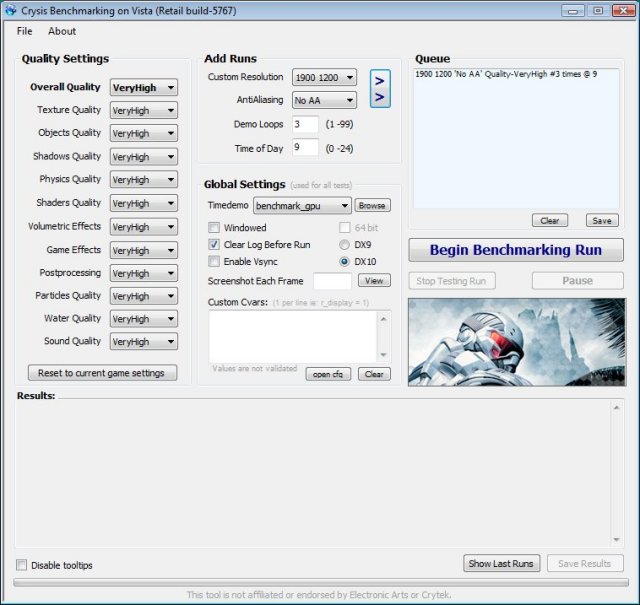
Crysis is the most highly anticipated game to hit the market in the last several years. Crysis is based on the CryENGINE™ 2 developed by Crytek. The CryENGINE™ 2 offers real time editing, bump mapping, dynamic lights, network system, integrated physics system, shaders, shadows, and a dynamic music system, just to name a few of the state-of-the-art features that are incorporated into Crysis. As one might expect with this number of features, the game is extremely demanding of system resources, especially the GPU. We expect Crysis will soon be replaced by its sequel, the DX11 compatible Crysis 2.
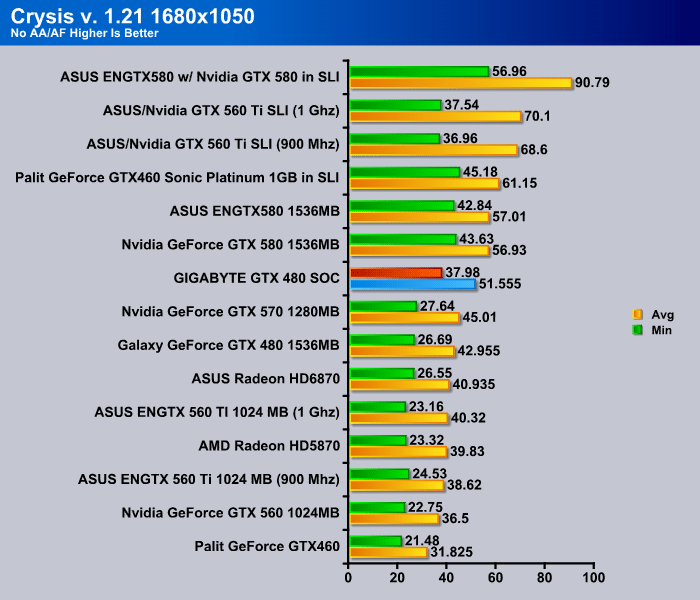
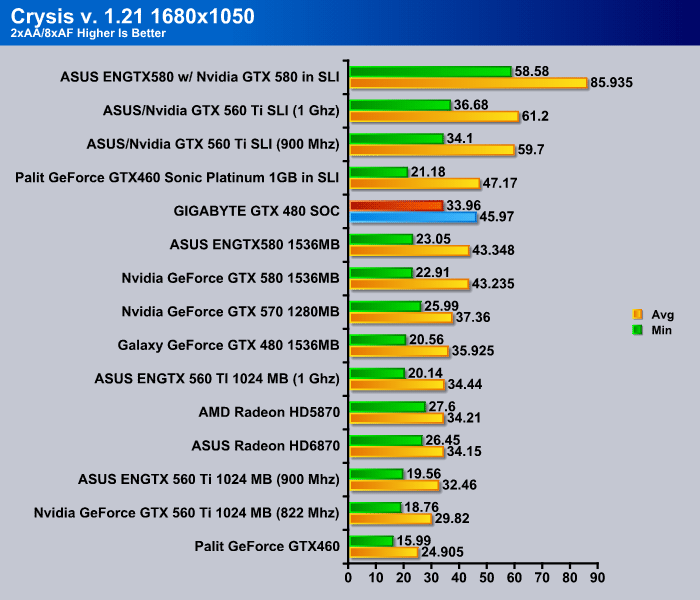
The performance increase is quite nice in Crysis. There is an about 6-8 FPS performance increase between the GTX 570 and the GTX 480 SOC, depending on the resolution and graphics settings. This justifies the prices for the cards as well: the GTX 570 costs around $350, while the GTX 480 SOC, which has high overclocking potential, costs around $400. In the 1680×1050 2xAA benchmark, the GIGABYTE GTX 480 SOC was also able to get 2 FPS higher than the GTX 580, which costs about $100 more. Quite impressive!
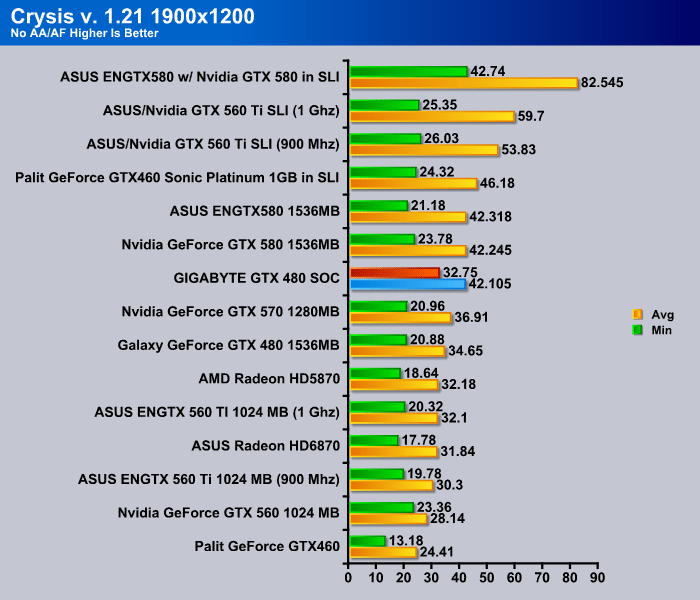
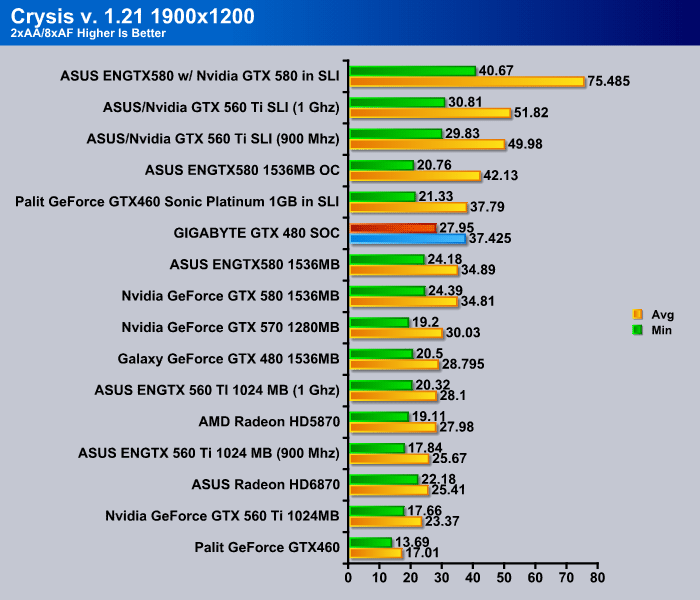
We can see the same pattern here in the 1900×1200 resolution benchmarks as we have seen in the 1680×1050 resolution benchmarks. The tests running with 2x AA enabled provided higher scores for the GTX 480 SOC than the GTX 580. At 1900×1200 resolution and 2x AA, the scores that the GIGABYTE GTX 480 SOC is able to acheive in Crysis are still really smooth, making gameplay flawless.
CRYSIS WARHEAD

Crysis Warhead is the much anticipated standalone expansion to Crysis, featuring an updated CryENGINE™ 2 with better optimization. It was one of the most anticipated titles of 2008.

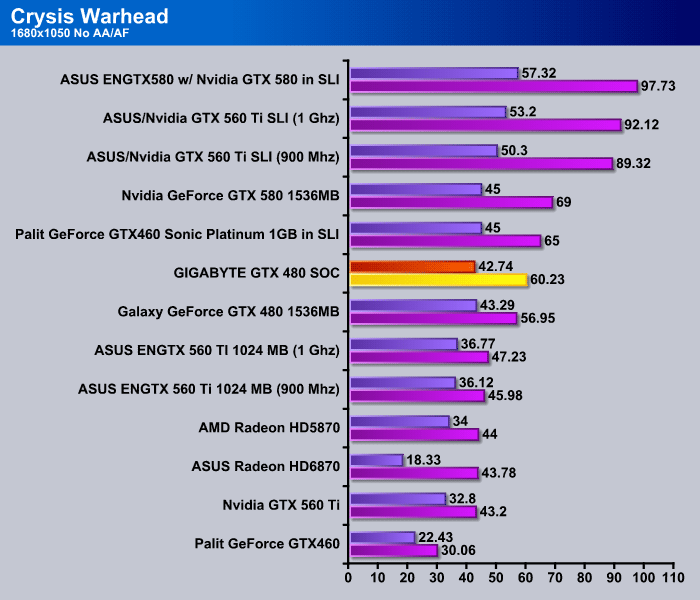
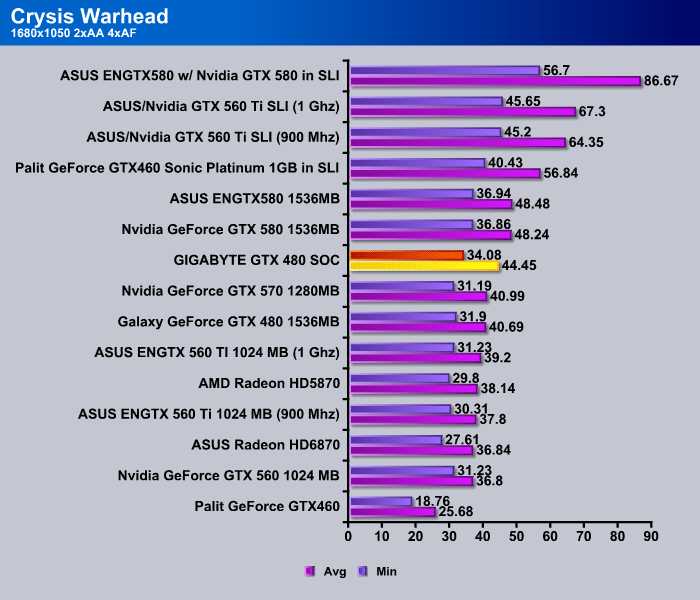
Crysis Warhead, on the other hand, is showing exactly the opposite results as Crysis did. Crysis Warhead has an optimized DirectX 10 CryEngine 2, which is supposed to provide even better performance for the cards. It is possible that since the Crysis game engine was not well optimized, the GTX 580 was suffering performance decreases because it is a newer GPU than the GTX 480.
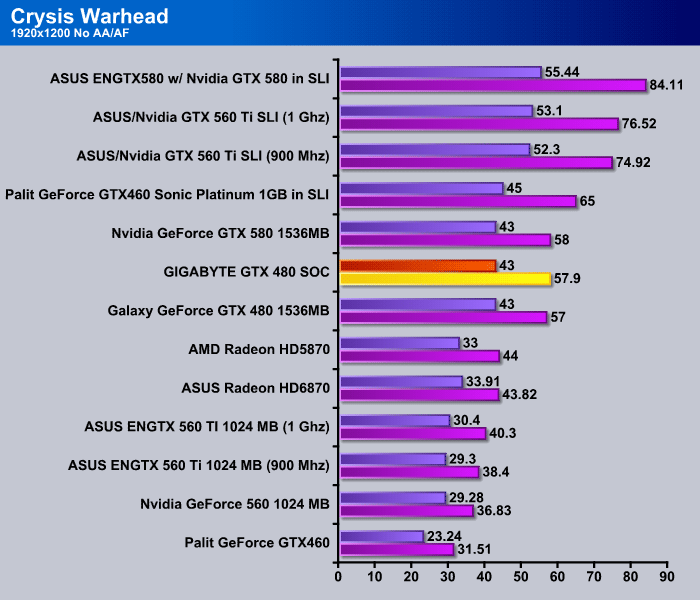

Either way, the GIGABYTE GTX 480 SOC is still able to gain about 4 FPS higher scores than the stock GTX 480, and surpass the performance of a GTX 570. It needs about 3 FPS in order to get to the performance that the GTX 580 is running at, but this should be possible by slightly overclocking the GIGABYTE GTX 480 SOC video card. Once again, even with the game maxed out on visual quality, and 2x AA at 1920×1200 resolution, the user is still getting a 36.13 average frames per second, which are totally playable frame rates.
Lost Planet 2

“Lost Planet 2 is a third-person shooter video game developed and published by Capcom. The game is the sequel to Lost Planet: Extreme Condition, taking place ten years after the events of the first game, on the same fictional planet.”
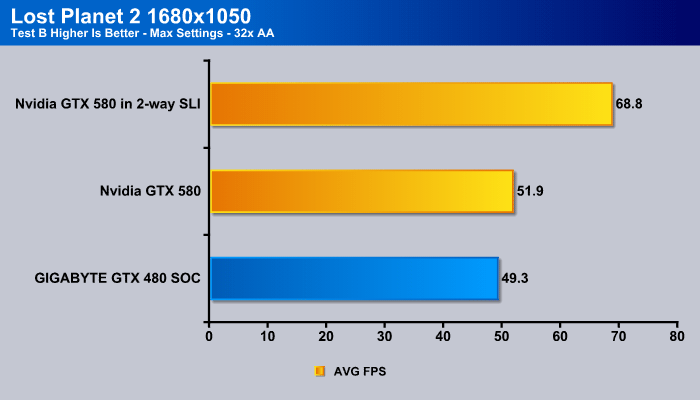
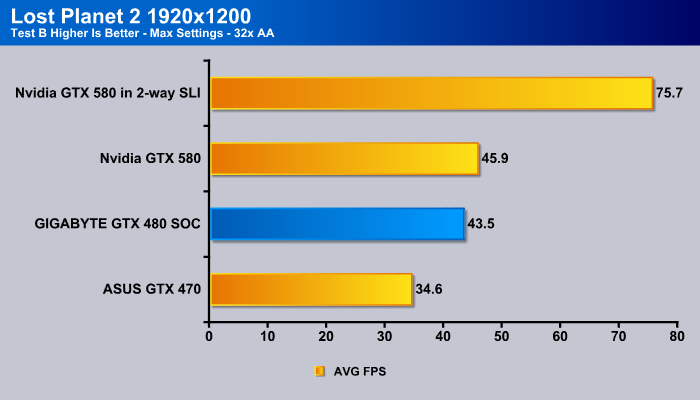
DirectX 11 games are highly anticipated in 2011, due to the fact that many are making the move to DirectX 11 video cards from their older DirectX 9 or DirectX 10 video cards. Lost Planet 2 is one of the games taking advantage of DX11, and the GTX 480 SOC shows great results even when Lost Planet 2 is fully maxed out in the graphics settings.
Just Cause 2

“Just Cause 2 is an open world action-adventure video game. It was released in North America on March 23, 2010, by Swedish developer Avalanche Studios and Eidos Interactive, and was published by Square Enix. It is the sequel to the 2006 video game Just Cause.
Just Cause 2 employs the Avalanche Engine 2.0, an updated version of the engine used in Just Cause. The game is set on the other side of the world from the original Just Cause, on the fictional island of Panau in Southeast Asia. Panau has varied terrain, from desert to alpine to rainforest. Rico Rodriguez returns as the protagonist, aiming to overthrow the evil dictator Pandak “Baby” Panay and confront his former mentor, Tom Sheldon.”
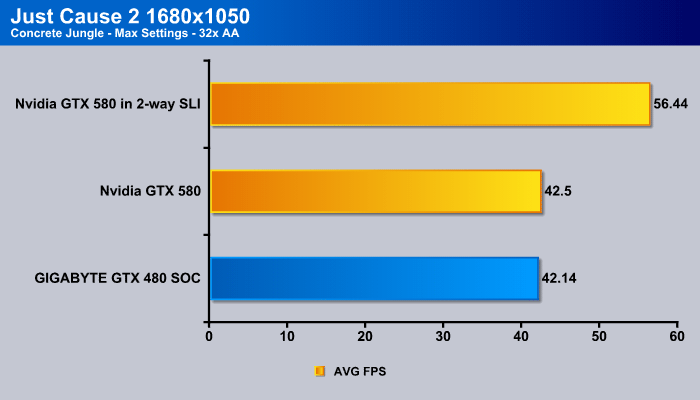
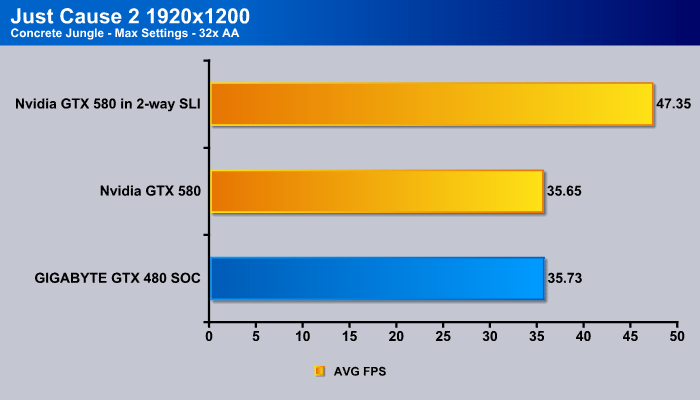
Just Cause 2 was released almost a year ago, but it was already taking advantage of DirectX 11. Just Cause 2 takes advantage of Tessellation and PhysX calculations to provide fantastic visual effects for the users. We can see this in the much lower FPS observed. Interestingly, since Just Cause 2 requires lots of PhysX calculations, especially in scenes that have lots of water, the GIGABYTE GTX 480 SOC was able to perform slightly better at maximum graphics settings than the Nvidia GTX 580.
Metro 2033

Metro 2033 is an action-oriented video game blending survival horror and first-person shooter elements. The game is based on the novel Metro 2033 by Russian author Dmitry Glukhovsky. It was developed by 4A Games in Ukraine and released in March 2010 for the Xbox 360 and Microsoft Windows. In March 2009, 4A Games announced a partnership with Glukhovsky to collaborate on the game. The game was announced a few months later at the 2009 Games Convention in Leipzig; a first trailer came along with the announcement. When the game was announced, it had the subtitle “The Last Refuge,” but this subtitle is no longer being used.
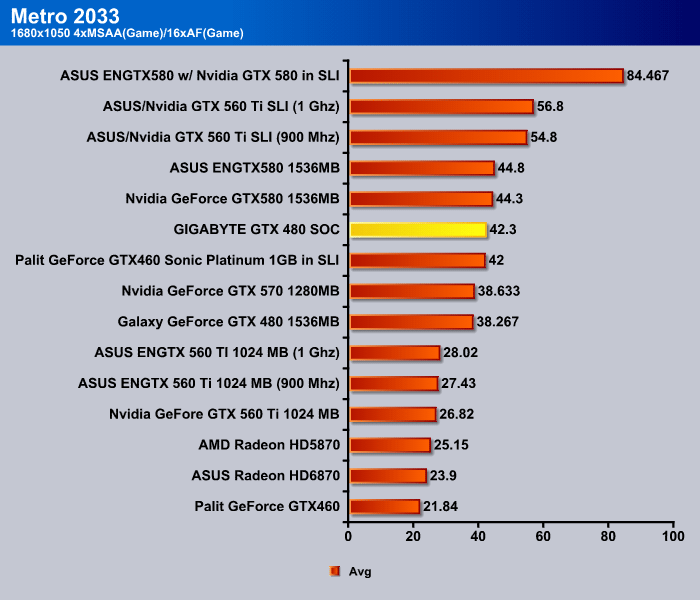
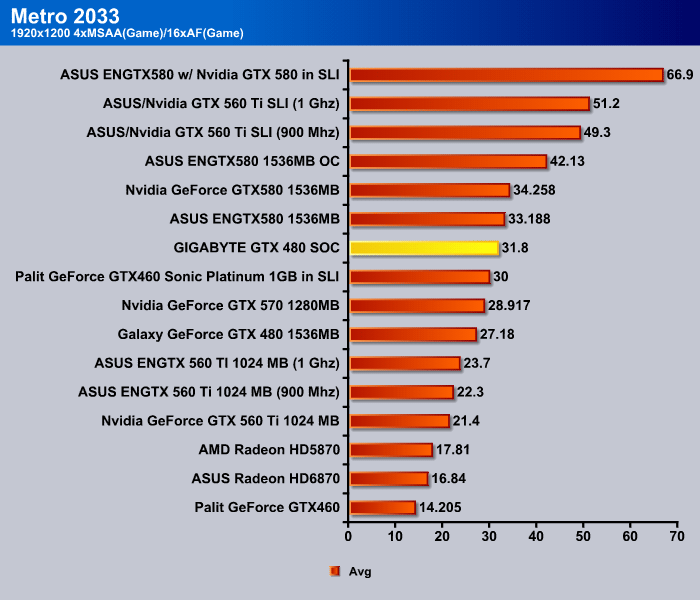
Metro 2033 is most likely the most GPU intensive PC game of 2010. We can see that the GTX 480 SOC was getting around 31.8 FPS, which barely makes the grade for smooth gameplay. Of course, it is not guaranteed that action scenes will have 31.8 FPS as well, which is why it is nice that GIGABYTE’s GTX 480 SOC can easily be overclocked even further to gain a few more FPS. It does run 4 FPS higher than the stock GTX 480, which would most likely cause some gameplay issues, as it only achieves 27.18 FPS during gameplay.
Conclusion
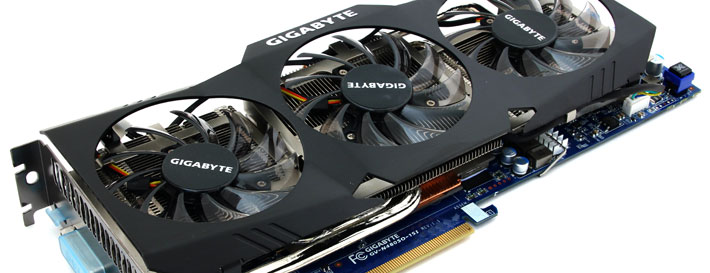
The GIGABYTE GTX 480 SOC is more than just an ordinary GTX 480. GIGABYTE managed to provide a cooler that keeps the card at optimal temperatures while keeping the fan noise to the minimum. With high-quality components, cherry-picked GPUs, and excellent current noise reduction, overclocking becomes an issue of the past. Dual-BIOS is provided for users looking into liquid nitrogen cooling, with a dedicated BIOS for bypassing the cold bug issues with exotic cooling solutions. GIGABYTE’s OC GURU overclocking tool also provides overclocking options that other software are currently unable to provide. Additionally, voltage measuring points are added on the PCB for overclockers to measure voltages in realtime.
With smaller cons about the card, like the higher power consumption, the unattractive cooler design, and fan cable mess that is visible from the side of the card, the GIGABYTE GTX 480 is currently available on Newegg.com for only $399. Other manufacturers still sell their stock reference cards at $500, while GIGABYTE is offers their high end Super Overclocked card for $100 cheaper. We believe that even with the minor cons that we mentioned, it is still a great option for gamers to consider this card for their latest build. Pairing two of these would not only provide more than enough performance for all the latest currently games on the market, but it would also keep noise levels to a minimum; this setup would easily compete with Nvidia’s current GTX 580s. Add a little bit of overclock to the factory overcocked frequencies, and the user can enjoy GTX 580 speeds, at a lower price.
| OUR VERDICT: GIGABYTE GeForce GTX 480 SOC Video Card | ||||||||||||||||||
|
||||||||||||||||||
| Summary: If you are currently running a GTX 480 video card in your system, the GIGABYTE GTX 480 SOC might just be a perfect card for some SLI action. While the power consumption might be higher on the GTX 480 than on the GTX 580, we believe that when the GIGABYTE GTX 480 SOC is overclocked even a bit further than the factory OC frequencies, and it can perform faster than a GTX 580 at a much lower price tag. We are putting the GIGABYTE GTX 480 SOC at the top of our list, and it earns an outstanding 9/10 points and the Bjorn3D Golden Bear Award. |